
PRAN Number UAE Guide (2026): How to Apply, Track & Use for Banks

Recent Insights
Table of Contents
PRAN Number UAE Guide (2026): How to Apply, Track & Use for Banks
Moving to Dubai means handling a lot of paperwork. One key number you’ll see early is the PRAN number in the UAE.
New residents often feel confused when they first encounter this code. Banks and employers may ask for it early, even before your Emirates ID card arrives.
PRAN stands for Personal Registration Acknowledgment Number. It shows that your Emirates ID application is in the system. It acts as proof that your ID process has started, even before your card is ready.
This guide covers what the PRAN number is, how it works, and why it matters. You’ll also learn how it helps with bank account setup and visa processing.
What Is a PRAN Number?
The PRAN number in the UAE is a 12-digit code. You get it when you submit your Emirates ID application. The Federal Authority for Identity, Citizenship, Customs and Port Security (ICP) issues it.
You’ll find it on your ID receipt. Many people miss it because they look for the Emirates ID number instead. But this code links your photo scan, visa file, and health check in the system.
Think of it as a bridge. Your visa starts the process. Your Emirates ID card completes it. The PRAN keeps both steps connected.
Without this code, you can’t track your ID application online. Banks also use it to verify that your ID process is active.
Who Needs a PRAN Number?
Anyone who applies for a UAE resident visa will get this code. That includes:
- Workers on company visas
- Business owners and investors
- Family members on a sponsor visa
- Freelancers with work permits
- Golden Visa holders
The rule for expats in the UAE is simple. Every new resident gets one when they apply for an Emirates ID. You also get a new code each time you renew an expired Emirates ID.
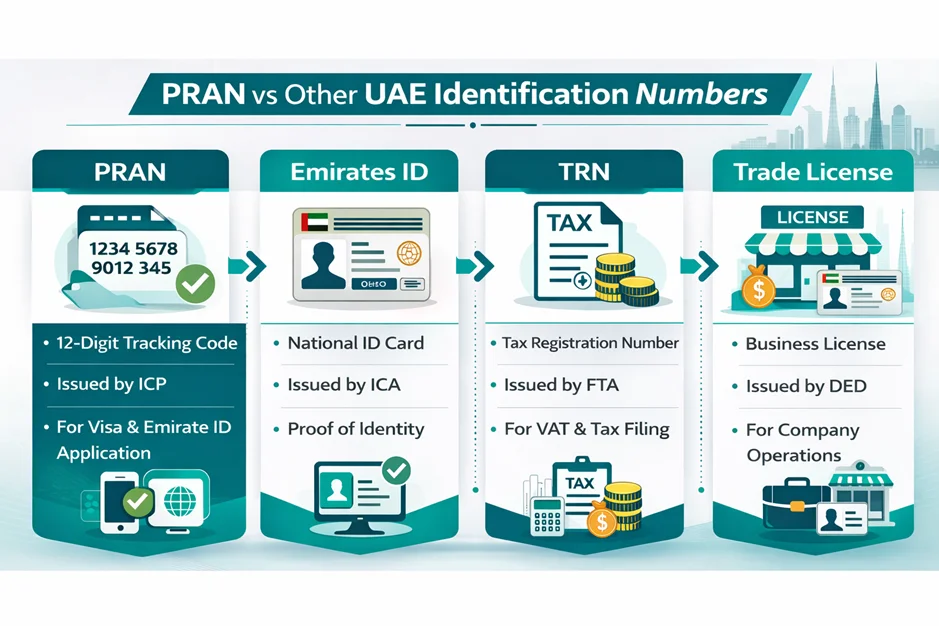
PRAN vs Emirates ID, TRN, Trade License
It’s easy to mix up these numbers. Each one serves a different role in the UAE system. The table below shows the key differences.
| Feature | PRAN Number | Emirates ID | TRN (Tax) | Trade License |
|---|---|---|---|---|
| Digits | 12 Digits | 15 Digits | 15 Digits | Varies |
| Valid For | Short Term | 1 to 10 Years | No Limit | 1 Year |
| Purpose | App Tracking | Main ID | Tax Filing | Business Use |
| Used For | Visa Process | Daily Life | Invoices | Operations |
How Do You Apply for a PRAN Number in the UAE?
You don’t apply for the PRAN number on its own. The system creates it when you submit your Emirates ID application. This happens online or at a typing centre.
Here are the steps to apply online in the UAE:
- Go to the ICP website or open the ICP mobile app.
- Select the option for a new ID card application.
- Enter your passport and visa details.
- Upload your photo and required files.
- Pay through the secure portal.
- Save or print your receipt.
Your receipt will show the PRAN code.
The online process is fast. Most people finish in minutes if their files are ready. Keep your phone nearby. You’ll need a code sent by SMS before you submit.
There’s no extra fee for the PRAN number in 2026. The cost is part of the Emirates ID fee. Extra charges apply only for urgent requests or data changes.
Check every detail before you submit. One wrong letter in your name can slow down your bank account setup.
What Documents Are Required for PRAN in the UAE?
You need clear digital scans of these files to apply:
- A clear copy of your valid passport
- Your UAE entry permit or current visa
- A passport photo with a white background
- A medical fitness test result (for ID renewal cases)
- A valid UAE mobile number for alerts
Check all PRAN requirements before you start. A missing file will get your application rejected. Store all files in a cloud folder for quick access.
How Long Does PRAN Processing Take? (2026 Update)
The PRAN code appears right after you pay. It doesn’t take time to generate.
The full Emirates ID takes longer. Initial checks take one to two days. If you need to give your fingerprints, the time depends on when a slot is available.
The government has made the process faster in 2026. Many ID cases close in just a few days. But small errors in your files can add delays.
If your case has no update for more than three days, check your documents again.
How Do You Check and Track Your PRAN Status?
Check your progress often. This helps you avoid last-minute problems.
To track your PRAN in the UAE, follow these steps:
- Go to the ICP Check ID Status page.
- Enter your PRAN reference code.
- Click submit to see your status.
Common status labels are:
- Pending fingerprints
- Under review
- Card printed
- Card sent
You can also check via the ICP app. The app sends alerts when your status changes. This helps you plan your next visit with no guesswork.
If the page shows no record, check your number again. Remove any extra spaces and try once more.
How Do Banks Use PRAN Numbers in the UAE?
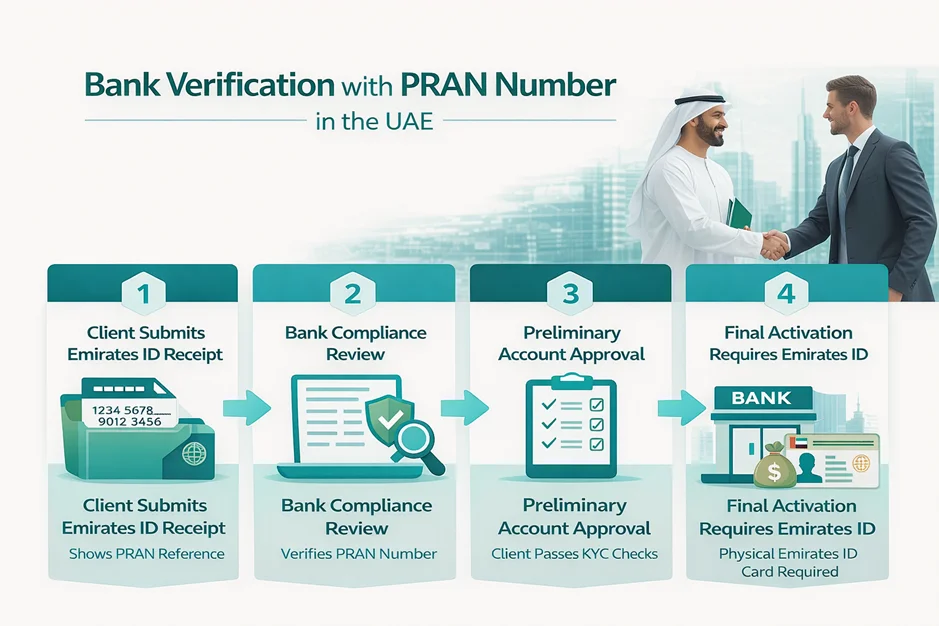
Opening a bank account is usually urgent for new residents. Most banks want the physical Emirates ID before they open an account. But early checks can start sooner.
This is where the PRAN number helps. Banks use it to confirm your ID process is active and in progress.
During early setup, the bank may ask for:
- Your Emirates ID receipt
- A copy of your passport
- A copy of your visa
- Work or business documents
This step lets the bank’s compliance team review your file early. It shows your visa process is valid and on track.
Final account setup may still need the physical card. Each bank sets its own rules.
How Do You Correct PRAN Errors?
Small mistakes can cause big problems. A wrong name or passport number can block your visa and bank account steps.
If you spot an error, request a PRAN correction right away. Don’t wait until after your fingerprints are done.
Common reasons to request a fix include:
- Wrong name spelling
- Wrong date of birth
- Wrong passport number
- Wrong country of origin
To fix the data, go to an ICP typing centre or submit a change request online. A small fee applies. Fix errors fast to avoid delays in your ID card and bank setup.
How Do You Replace a Lost PRAN?
Losing your receipt is common. Many residents panic when they can’t find it. But you don’t need to apply again.
Your PRAN code stays in the system. You just need to get a new copy of your receipt.
Here’s how to get it:
- Log into the ICP app or portal.
- Sign in with your UAE Pass.
- Open your application history.
- Download a new copy of your receipt.
The file will show your PRAN digit code. Save it in the cloud so you don’t lose it again.
If you can’t log in, go to a typing center. They can find your code using your passport.
Where Can You Use Your PRAN in the UAE?
Many new residents aren’t sure where to use their PRAN in the UAE. The code works at more than one place. It links many steps in your residency process.
You may need it at:
- Health clinics to link your test results to your file
- Fingerprint centers for ID scan sessions
- Health insurance firms to start your policy
- Banks during early KYC checks
- Phone companies when you sign up for a plan
Save the code on your phone. Most staff only need the number, not the paper receipt.
What Are the PRAN Compliance Requirements?
Identity checks follow strict digital rules. Meeting these rules keeps you safe from fines and delays.
You must give your fingerprints by the set date. Missing that date can lead to a fine.
Your details must match your passport word for word. Even one wrong letter can flag your file.
Before you submit, check your name against the scan section of your passport. Getting this right now avoids problems with your bank and visa later.
PRAN Number Checklist
Use this quick checklist to stay on track:
- Passport valid for at least six months
- Photo meets the required specs
- Save your PRAN reference from the receipt
- Fingerprint session booked
- Bank notified if early KYC is needed
Keeping these items in order cuts down on delays.
Common PRAN Issues and How to Resolve Them
Most problems are easy to fix once you know the cause.
Bank Rejecting Account Due to Missing PRAN
Some banks updated their rules recently. If your case is on hold, share the Emirates ID receipt. It has the code the bank needs.
If the bank staff aren’t sure, ask them to check the KYC system again. The issue is often a missing file, not a real problem.
Name Mismatch Between Passport and Application
Long names often get cut short in digital systems. If your name doesn’t match your passport, request a fix right away.
Go to an ICP centre or a typing office. Act fast to avoid bigger issues later.
Status Stuck at Card Printed
This means your card is ready. Delivery may still be on the way. Wait up to three working days before you escalate.
If there’s still no update, contact ICP support or check with the delivery service.
ICP Portal Not Accepting Number
If the portal rejects your code, try these steps:
- Check that you entered all 12 digits
- Remove any spaces or special marks
- Refresh the page and try again
- Clear your browser cache if needed
The issue may be a short outage. Trying on a different device can also help.
Case Study: Resolving a PRAN Delay Before Bank Account Activation
A client moved to Dubai as an investor. He needed to open a business bank account fast. The bank had to verify his identity before it could proceed.
His Emirates ID application was already in the system. But the bank’s team couldn’t find his file. The cause was a small spelling error between his passport and his ID form.
The error appeared in his PRAN record. So, the bank put his account on hold. Our team checked the receipt and found the issue right away.
We worked with a typing centre to submit a correction request. The fix went through in 24 hours. Once the system updated, the bank ran the check again.
His account went live with no further issues. The whole case closed in two working days.
Client Testimonial:
“I didn’t know a small spelling mistake could block my bank account. The team fixed the PRAN error fast and walked me through each step. Their help stopped a major delay in my business setup.”
Investor, Dubai Mainland Setup (2026)
How Dubai Business & Tax Advisors Can Help
UAE resident paperwork has strict rules and tight deadlines. At Dubai Business & Tax Advisors, we handle all of this for you.
Our team works with the ICP and banks on your behalf. We catch name errors and file issues before they cause delays. We guide you from your entry permit to your final Emirates ID card through our comprehensive PRO services.
Conclusion
The PRAN number is the foundation of your UAE residency. It keeps your name in the system from day one. Use this guide to stay on track and avoid costly delays.
Always keep a digital copy of your PRAN receipt. Check your status on the ICP portal often. Good planning now prevents legal issues later.
Contact Dubai Business & Tax Advisors to get your residency on the right track.
Frequently Asked Questions (FAQs)
A PRAN is the code the system creates when you submit your Emirates ID application. It shows your ID process is active. Banks, employers, and service firms use it to verify that your residency has started.
You don’t apply for it on its own. The system creates it when you submit your Emirates ID through the ICP portal, the app, or a typing center. Your receipt shows the 12-digit code after you pay.
You need these files when you apply for your Emirates ID:
- A copy of your passport
- Your UAE entry permit or visa
- A digital passport photo
- Your phone number for alerts
Correct details help avoid delays.
You need passport copies of all owners, Emirates ID, business activity details, trade name approval, MOA, and an office lease. Some activities need extra approval.
The code appears right after you pay. Full ID approval takes one to three days. The time depends on when your fingerprint session is and whether your files are correct.
Go to the ICP Check ID Status page. Enter your PRAN reference number. The system shows your current step, such as pending fingerprints or card printed. The ICP app also sends live updates.
Banks use the code during early KYC checks. It shows your Emirates ID application is active. You may need to share your receipt along with your passport and visa copy.
Yes. Every new resident gets one when they apply for an Emirates ID. No extra application is needed.
Employers don’t create the code. The system makes it when the worker submits their Emirates ID application. HR teams may ask for the code to update payroll or records.
Common issues are wrong name spelling, wrong passport number, and wrong date of birth. These errors can delay your ID card and bank account setup.
Go to a typing center or submit a change request via ICP online. A small fee applies. Fix it right away to avoid compliance issues.
Log into the ICP portal or app with your UAE Pass. Open your case history and download a new copy of your receipt. The code will be on the file.
There’s no fee just for the PRAN code. The cost is part of the Emirates ID fee. Extra charges apply for urgent requests or data changes.
Employers use the code to confirm your ID is active when you join. Banks may also use it during early checks before they activate your salary account.
Latest news & articles


About the Author:
AURANGZAIB CHAWLA
As CEO of DBTA, Aurangzaib Chawla advises globally mobile businesses and individuals on cross-border tax planning and structuring. With expertise spanning the UK, UAE, and wider GCC, Zaib helps clients minimise double taxation, protect assets, and achieve long-term financial efficiency while staying fully compliant.
Planning to launch in Dubai or the UAE?
Let’s talk about how to structure your business for growth the smart, compliant, and tax-efficient way

About the Author:
AURANGZAIB CHAWLA
As CEO of DBTA, Aurangzaib Chawla advises globally mobile businesses and individuals on cross-border tax planning and structuring. With expertise spanning the UK, UAE, and wider GCC, Zaib helps clients minimise double taxation, protect assets, and achieve long-term financial efficiency while staying fully compliant.
Planning to launch in Dubai or the UAE?
Let’s talk about how to structure your business for growth the smart, compliant, and tax-efficient way
About the Author:
AURANGZAIB CHAWLA

As CEO of DBTA, Aurangzaib Chawla advises globally mobile businesses
and individuals on cross-border tax planning and structuring. With expertise spanning the UK, UAE, and wider GCC, Zaib helps clients minimise double taxation, protect assets, and achieve long-term financial efficiency while staying fully compliant.
Planning to launch in Dubai or the UAE?
Let’s talk about how to structure your business for growth the smart, compliant, and tax-efficient way.
Connect with Reliable Dubai Business Consultants
Get in Touch